
Best Clinic Management Software in India (2026): Compared by Price & Features
Most Indian clinics still run on a mix of registers, WhatsApp groups, and Excel sheets. It works — until a patient’s file goes missing, a bill doesn’t match a receipt, or a doctor can’t recall a patient’s last visit during a follow-up. Clinic management software exists to close that gap: one system for registration, scheduling, records, prescriptions, billing, and reporting, instead of five disconnected habits.
This guide compares clinic management software in India by price and features, so you can shortlist the right fit for your clinic’s size, specialty, and budget — without vendor hype.
What Is Clinic Management Software?
Clinic management software is a digital platform that helps clinics manage patient registration, appointment scheduling, medical records, prescriptions, billing, and reporting from one system. It replaces paper records and disconnected tools, giving doctors and staff a single, searchable view of every patient and every transaction.
What does clinic management software do?
It handles the daily operational backbone of a clinic: booking and rescheduling appointments, storing patient history and clinical notes, generating digital prescriptions, creating invoices and tracking payments, sending appointment reminders, and producing reports on revenue, patient volume, and doctor performance.
How it differs from EMR and basic booking apps
A basic appointment booking app only manages the calendar. An EMR (Electronic Medical Record) system focuses narrowly on clinical documentation — diagnoses, notes, prescriptions. Clinic management software is broader: it usually includes EMR-like functionality alongside scheduling, billing, inventory, staff management, and analytics, covering both clinical and administrative workflows in one place.
TL;DR: Choosing Clinic Management Software in India
|
Question |
Short Answer |
|---|---|
|
Who needs it? |
Solo doctors, small clinics, multi-doctor practices, physiotherapy/dental/diagnostic clinics, multi-location chains |
|
Core features |
Patient records, scheduling, EMR, billing, reminders, reporting |
|
Pricing models |
Free (limited), monthly/annual subscription, per-doctor, per-clinic, enterprise/custom |
|
What to compare |
Features needed vs. offered, ease of use, data security, support, scalability, total cost including add-ons |
|
Best by size |
Solo doctors: lightweight, low-cost tools. Growing clinics: mid-tier with billing + EMR. Multi-location: enterprise plans with centralized reporting |
|
Biggest buying mistake |
Choosing on price alone without testing the workflow |
How Clinics in India Actually Use This Software
A typical day: a patient calls to book → the receptionist checks doctor availability and confirms the slot → on arrival, the patient is checked in and their history pulled up → the doctor adds clinical notes and a digital prescription → the front desk generates an invoice and records payment → a follow-up reminder is scheduled → at month-end, the owner reviews a revenue and patient-volume report.
A small clinic moving from paper to software usually sees the biggest early win in fewer missed follow-ups and faster billing, since both were previously manual and easy to forget.
Key Features to Look For
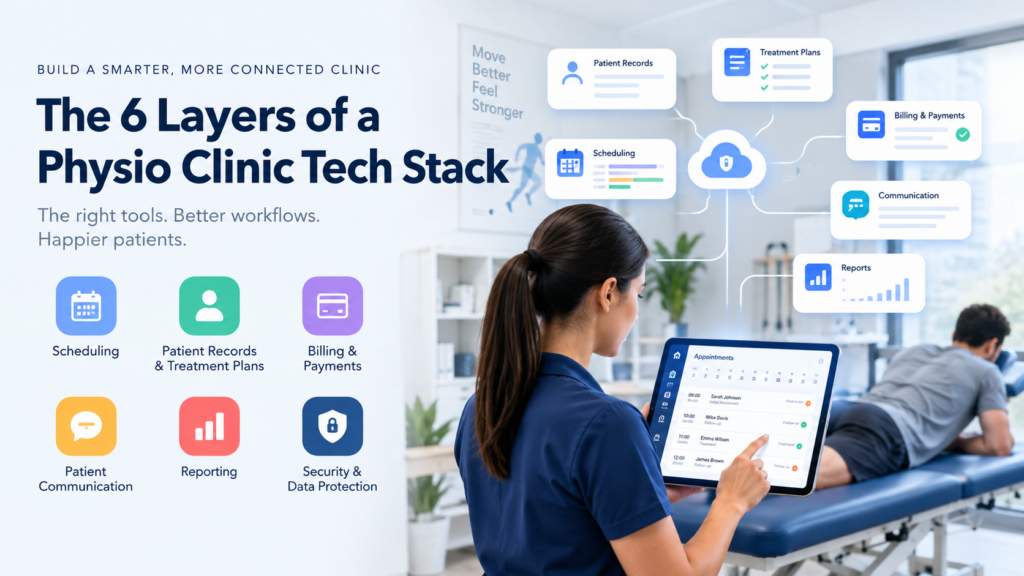
Patient Management — patient profiles, contact details, medical history, and visit history in one searchable record.
Appointment Scheduling — calendar view of doctor availability, rescheduling, cancellations, automated reminders, and (in many tools) online self-booking.
Electronic Medical Records — clinical notes, diagnoses, prescriptions, and treatment history tied to each visit. Some platforms label this EMR; the underlying capability matters more than the label.
Billing and Payments — invoices, receipts, discounts, applicable taxes, outstanding balance tracking, and revenue reports.
Prescription Management — digital prescriptions with searchable prescription history.
Patient Communication — reminders and follow-up notifications, typically via SMS or email; WhatsApp integration is offered by some vendors but should be confirmed directly, since availability varies by provider and plan.
Reports and Analytics — revenue, appointment volume, patient trends, doctor-wise performance, and pending payments.
Inventory Management — useful mainly for clinics stocking medicines, consumables, or equipment; less relevant for consult-only practices.
Multi-Doctor and Multi-Clinic Support — role-based access across doctors, departments, and locations with centralized reporting.
Security and Access Control — user roles, permission levels, data backups, and audit logs. Ask any vendor directly about their specific security practices and certifications rather than assuming a standard level of compliance.
Feature Depth by Software Tier
|
Feature |
Basic |
Standard |
Advanced |
|---|---|---|---|
|
Patient management |
Basic profile |
Full history + documents |
Full history + custom fields |
|
Appointment scheduling |
Manual calendar |
Reminders + rescheduling |
Online booking + optimization |
|
EMR |
Notes only |
Notes + prescriptions |
Structured clinical workflows |
|
Billing |
Basic invoicing |
Invoicing + payment tracking |
Full revenue cycle management |
|
Reports |
Minimal |
Standard dashboards |
Custom, multi-location analytics |
|
Multi-doctor/location |
Not supported |
Multi-doctor |
Multi-doctor + multi-location |
|
Integrations |
None/limited |
Payment gateway |
Payment, SMS, WhatsApp, telehealth |
Best Clinic Management Software in India: Comparison Framework
There is no single “best” clinic management software — the right choice depends on clinic size, specialty, number of doctors, budget, and required integrations. Use this framework to shortlist, and always confirm current pricing and features directly with each vendor before deciding, since plans change frequently.
|
Software / Solution |
Best For |
Core Focus |
Pricing Model |
Cloud-Based |
Free Trial |
|---|---|---|---|---|---|
|
Practo Ray |
Individual doctors, small-to-mid clinics |
Scheduling, EMR, billing |
Subscription |
Yes |
Contact vendor for current pricing |
|
Zoctr / eKincare-style platforms |
Multi-specialty and chains |
Records + analytics |
Subscription/enterprise |
Yes |
Contact vendor for current pricing |
|
PhysioSoftware |
Physiotherapy clinics |
Notes, scheduling, billing |
Subscription |
Yes |
Contact vendor for current pricing |
|
Physiotherapy and rehab clinics |
Practice management for physiotherapists |
Contact vendor for current pricing |
Cloud-based (verify with vendor) |
Contact vendor for current pricing |
|
|
Generic small-clinic tools |
Solo doctors, low budget |
Basic scheduling + billing |
Free tier or low monthly fee |
Varies |
Often available |
Pricing checked: information above should be independently confirmed with each vendor before publishing or purchasing, as SaaS pricing and plans change frequently. Do not treat any figure here as final without vendor confirmation.
Clinic Management Software Price in India
How much does clinic management software cost in India? Pricing typically falls into a few models rather than one fixed number, and depends on the number of doctors, users, and features enabled. Confirm exact pricing directly with vendors, as it changes often.
-
Free software — usable for very small, single-doctor setups with basic scheduling; often limited on records storage, users, or support.
-
Monthly subscription — standard SaaS model, billed per clinic or per user.
-
Annual subscription — often discounted versus paying monthly, but requires a longer commitment.
-
Per-doctor pricing — cost scales as you add doctors, common for multi-doctor practices.
-
Per-clinic pricing — a flat fee per location regardless of doctor count, better for smaller teams per site.
-
Enterprise/custom pricing — for hospital-adjacent or multi-location chains needing custom integrations and dedicated support.
Hidden or additional costs to ask about: setup fees, data migration from your old system, charges for additional users beyond the base plan, SMS/WhatsApp messaging credits, payment gateway fees, third-party integrations, custom development, staff training, and premium support tiers.
Best Clinic Management Software by Clinic Type
-
Solo doctors — prioritize simplicity, fast setup, and low cost over advanced analytics.
-
Small clinics — look for solid scheduling, billing, and reminders without unnecessary complexity.
-
Multi-doctor clinics — role-based access and doctor-wise reporting become essential.
-
Physiotherapy clinics — treatment-plan tracking, session-wise notes, and exercise/progress documentation matter most; platforms like Phyjio and PhysioSoftware are built specifically around this workflow, so it’s worth comparing their physiotherapy-specific modules against general-purpose clinic software.
-
Dental and dermatology clinics — visual/imaging support and procedure-specific templates add value.
-
Diagnostic and rehabilitation clinics — inventory and equipment tracking, plus structured reporting, matter more.
-
Multi-location practices — centralized, cross-branch reporting and permission controls are the deciding factor.
In every case, verify specialty-specific claims directly with the vendor rather than assuming a general clinic tool covers specialty workflows well.
Benefits of Clinic Management Software
Reduced administrative workload, faster appointment handling, organized patient records, fewer billing errors, better follow-up tracking, improved patient experience, clearer revenue visibility, less duplicate data entry, and easier month-end reporting. [Insert verified statistic from an authoritative healthcare source where available] — avoid citing specific percentages unless sourced from a credible, current study.
Common Problems It Solves
|
Clinic Problem |
Software Solution |
|---|---|
|
Missed appointments |
Automated reminders |
|
Paper records |
Digital, searchable patient records |
|
Billing errors |
Integrated invoicing and payment tracking |
|
Lost patient history |
Centralized records |
|
Manual, delayed reports |
Automated dashboards |
|
Follow-up gaps |
Scheduled follow-up reminders |
|
Staff coordination issues |
Shared, role-based workflows |
EMR vs. Clinic Management Software
|
Aspect |
EMR |
Clinic Management Software |
|---|---|---|
|
Patient records |
Core focus |
Included |
|
Clinical documentation |
Detailed |
Included, often lighter |
|
Appointment scheduling |
Sometimes |
Core focus |
|
Billing |
Rarely |
Core focus |
|
Staff/role management |
Rarely |
Included |
|
Reporting |
Clinical only |
Clinical + operational |
Many modern platforms combine both, so the distinction matters less than checking whether a specific product actually covers the depth you need in each area.
Clinic vs. Hospital Management Software
Small clinics and solo practices generally don’t need the complexity of a hospital information system (bed management, multi-department lab integration, complex insurance workflows). Clinic management software is scoped to outpatient, single- or few-doctor operations; hospital software is built for inpatient care and larger institutional workflows. Buying more system than your clinic needs usually means paying for and maintaining unused complexity.
Cloud-Based vs. On-Premise Clinic Software
|
Factor |
Cloud-Based |
On-Premise |
|---|---|---|
|
Upfront cost |
Lower |
Higher |
|
Installation |
Minimal |
Requires setup |
|
Maintenance |
Handled by vendor |
Handled in-house |
|
Accessibility |
Any device, anywhere |
Limited to local systems |
|
Updates |
Automatic |
Manual |
|
Multi-location access |
Easier |
Harder |
|
Internet dependency |
Required |
Not required |
Is cloud-based clinic software better? For most small and mid-sized Indian clinics, cloud-based software is generally more practical due to lower upfront cost, easier multi-location access, and vendor-managed maintenance. On-premise can still suit clinics with strict internal data-control requirements or unreliable internet access — the right choice depends on the clinic’s specific constraints, not a universal rule.
How to Choose the Right Software: A Practical Checklist
-
Define your clinic’s actual workflow and pain points.
-
Count doctors, staff, and expected patient volume.
-
Check depth of patient management and EMR features.
-
Evaluate scheduling flexibility and reminder automation.
-
Review billing, invoicing, and payment tracking capability.
-
Ask about integrations (payment gateways, SMS/WhatsApp, telehealth).
-
Ask directly about data security, backups, and access controls.
-
Check support availability and response times.
-
Ask about data migration from your current system.
-
Test the interface yourself with a free trial or demo before committing.
10 Questions to Ask Before Buying
-
What exactly is included in the base price?
-
What costs extra (users, SMS, integrations, support)?
-
Is pricing per doctor, per clinic, or per user?
-
Can we migrate our existing patient data, and what does that cost?
-
What security and backup measures are in place?
-
Is the software cloud-based or does it need local installation?
-
What support is available, and during what hours?
-
Can it scale if we add doctors or locations later?
-
Is there a free trial or demo available?
-
What is the contract length and cancellation policy?
Frequently Asked Questions
1. What is clinic management software?
A digital platform that manages patient records, scheduling, prescriptions, billing, and reporting for a clinic in one system.
2. What is the best clinic management software in India?
There isn’t one universal best option — the right choice depends on clinic size, specialty, budget, and required features. Compare shortlisted vendors against your specific workflow.
3. How much does clinic management software cost in India?
Costs vary by pricing model — free, monthly/annual subscription, per-doctor, or enterprise. Confirm current pricing directly with vendors.
4. Which clinic management software is best for small clinics?
Look for tools with simple scheduling, billing, and reminders without unnecessary complexity or high per-user costs.
5. Is clinic management software available for solo doctors?
Yes, many vendors offer lightweight, lower-cost plans designed for single-doctor practices.
6. What features should clinic software have?
At minimum: patient records, appointment scheduling, billing, and basic reporting; EMR and communication tools add further value.
7. What is the difference between EMR and clinic management software?
EMR focuses on clinical documentation; clinic management software covers both clinical records and administrative operations like billing and scheduling.
8. Is cloud-based clinic software safe?
Security depends on the specific vendor’s practices — ask directly about encryption, backups, and access controls rather than assuming safety by default.
9. Can clinic management software manage appointments and billing?
Yes, this is core functionality in most clinic management platforms.
10. Can clinic software manage multiple doctors?
Most mid-tier and advanced plans support multi-doctor scheduling and role-based access; confirm limits on basic plans.
11. Can clinic management software work on mobile devices?
Most cloud-based platforms offer mobile-friendly access or dedicated apps; verify with the specific vendor.
12. Can clinic software integrate with WhatsApp?
Some vendors offer this; it varies by provider and plan, so confirm before assuming availability.
13. Does clinic management software support online appointments?
Many platforms support patient self-booking; check whether this is included or a paid add-on.
14. What is the difference between clinic and hospital management software?
Clinic software is scoped for outpatient, smaller practices; hospital software handles inpatient care and larger institutional workflows.
15. Is free clinic management software worth using?
It can work for very small, low-volume solo practices, but often lacks scalability, advanced reporting, and dedicated support.
16. How long does it take to implement clinic management software?
This varies by clinic size and data volume — ask the vendor for a realistic timeline based on your specific setup.
17. Can existing patient data be migrated?
Most vendors support migration, but methods, costs, and timelines differ — confirm directly.
18. Does clinic management software support telemedicine?
Some platforms include or integrate telehealth features; this is not universal, so confirm before assuming.
19. How does AI improve clinic management software?
AI is increasingly used for documentation assistance, appointment reminders, and administrative automation — clinical decisions should still remain with qualified healthcare professionals, with AI outputs reviewed rather than relied on directly.
20. What should I check before buying clinic software?
Feature fit, total cost including add-ons, security practices, support quality, and scalability — ideally verified through a live demo or trial.
Final Verdict
The best clinic management software in India is the one that matches your clinic’s actual workflow, doctor count, specialty, budget, and growth plans — not the one with the longest feature list or the loudest marketing. Start by listing your must-have features, shortlist two or three vendors that fit your clinic type and budget, and test each with a demo or free trial before committing.
If you run a physiotherapy or rehab practice, it’s worth specifically comparing specialty-built options like Phyjio against general-purpose clinic software, since treatment-plan tracking and session documentation needs differ from a typical outpatient clinic. Whatever you choose, request a demo, compare pricing in writing, and confirm data migration and support terms before signing a contract.