
Replace Spreadsheets & Paper Files in Your Physio Clinic
Move from paper files, Google Sheets and email threads to one physiotherapy clinic system for records, appointments, billing and treatment plans.
Before you read on
Records, payments and schedules in separate tools lead to missed appointments, delayed payments and wasted time. A single system keeps them together.
Currently you can add patient data manually. Phyjio says easier import is planned for an upcoming update.
No. Phyjio states that you can set up your clinic and start using it without technical skills.
Replace paper files and spreadsheets with one physiotherapy system. Phyjio combines patient records, appointments, billing and treatment plans in one place, so you no longer rely on paper files, Google Sheets and email threads that are hard to search when it matters.
Key takeaways
- Clinics often manage records, payments and schedules in separate tools.
- The result is missed appointments, delayed payments and wasted time.
- Phyjio keeps patient records, sessions, invoices and calendars together.
- Patient data is currently added manually; easier import is planned.
- Start with a free trial, no credit card required.
See it in Phyjio
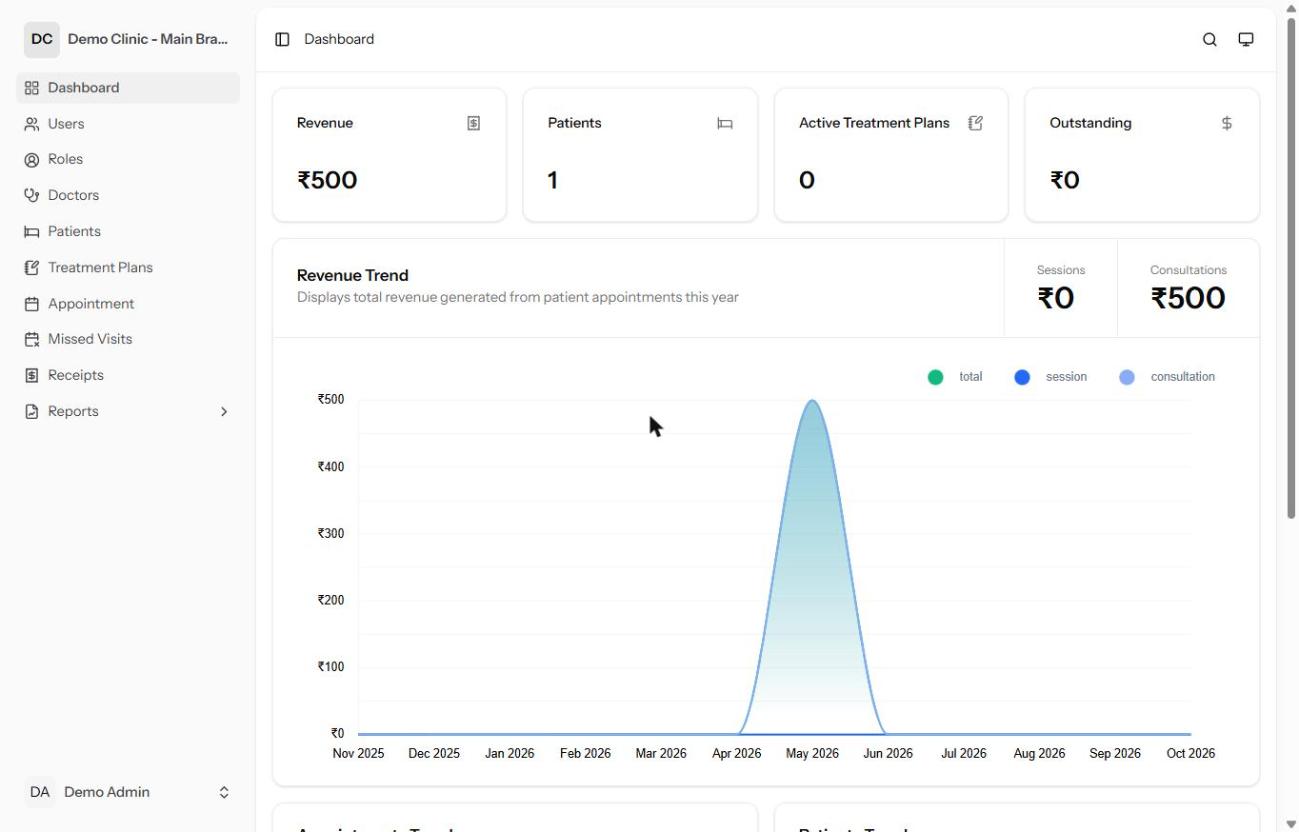
- Summary cards for Revenue, Patients, Active Treatment Plans and Outstanding.
- A Revenue Trend chart split into sessions and consultations.
- Appointments Trend and Patients Trend charts.
- Separate Patient Report and Revenue Report pages, generated by daily, monthly or yearly frequency and a start and end date.
What goes wrong with paper and spreadsheets
- Scattered patient records: history, notes and treatment plans spread across paper files, Google Sheets and email threads are hard to access quickly.
- Missed payments and unbilled sessions: sessions get delivered but never invoiced.
- Scheduling conflicts and no-shows: phone and calendar-app booking leads to double bookings and wasted time.
What replaces each tool
| Before | In Phyjio |
|---|---|
| Paper files and email threads | Patient records |
| Spreadsheet of sessions | Session tracking |
| Spreadsheet of invoices | Billing |
| Phone and calendar apps | Scheduling |
Moving over
Add your clinic, add patients manually, and start scheduling and documenting sessions. Phyjio says most clinics can get started within a day, and that easier import of existing records is being worked on.
Check what your clinic still relies on
What are you still using?
Tick what your clinic uses today to see which Phyjio feature covers it.
Nothing selected yet.
From spreadsheet column to Phyjio field
Most clinic spreadsheets grow the same columns. Here is where each one lives in Phyjio, so you know exactly where information goes when you move across.
| In your spreadsheet | In Phyjio |
|---|---|
| Name, phone, email | Patient Information: full name, mobile number, email |
| Age, gender, date of birth | Patient Information: age, gender, date of birth |
| Address | Address Information: country, state, city, pincode, full address |
| Medical notes, allergies | Medical Information and Additional Notes |
| Number of sessions, sessions left | Treatment Plans: Total Days, Completed and Remaining |
| Appointment dates | Appointment calendar and listing |
| Amounts paid | Receipts: amount, receipt date, receipt type |
| Monthly totals | Revenue Report and Patient Report |
Moving over without a bulk import
Phyjio's FAQ is clear on this point: today you add patient data manually, and an easier way to bring in existing records is planned for a future update. That is less of a barrier than it sounds, because you rarely need every historical row on day one.
- Start with the patients you are seeing this week and add them to Phyjio.
- Create treatment plans for patients who are mid-course.
- Add other patients as they next come in, so the system fills itself as you work.
- Keep the old spreadsheet read-only as an archive until you are comfortable.
What you stop doing
- Searching several files to find one patient's history.
- Counting sessions by hand to see how many are left.
- Cross-checking a diary against a payment sheet to find unbilled work.
- Rebuilding monthly totals from scratch at the end of every month.
Why paper and spreadsheets break down
They work while a practice is small. As patients and staff grow, the problems accumulate: records are in several places, nobody can see the whole picture, and information is only as current as the last person who updated it. A system built for physiotherapy keeps one record per patient and links plans, appointments and payments so they stay consistent without extra effort.
Frequently asked questions
Why move from spreadsheets to physiotherapy software?
Records, payments and schedules in separate tools lead to missed appointments, delayed payments and wasted time. A single system keeps them together.
Can I import my spreadsheets into Phyjio?
Currently you can add patient data manually. Phyjio says easier import is planned for an upcoming update.
Do I need technical knowledge?
No. Phyjio states that you can set up your clinic and start using it without technical skills.
Is Phyjio designed for physio clinics?
Yes. It is built only for physiotherapy clinics.
Leave the spreadsheets behind
Start a free trial with no credit card required, and get free onboarding support from the Phyjio team.
Start Free TrialBook a Demo