
Physiotherapy Billing & Invoicing Software
Create invoices per session or treatment package, track paid, partial and overdue payments, and see revenue by period, therapist or service with Phyjio.
Before you read on
Yes. Phyjio can generate invoices per session or per treatment package.
Yes. Phyjio tracks payment status across paid, partial and overdue invoices.
Yes. Revenue reports can be viewed by period, therapist or service type.
Phyjio handles billing for physiotherapy clinics in one system. You can generate an invoice for a single session or a whole treatment package, record payments, see which invoices are paid, partially paid or overdue, and review revenue without opening a spreadsheet.
Key takeaways
- Invoices can be generated per session or per treatment package.
- Payment status is tracked across paid, partial and overdue invoices.
- Revenue reports can be viewed by period, therapist or service type.
- Phyjio lists integration with standard payment methods.
- Invoicing can follow sessions automatically, so delivered sessions are not left unbilled.
See it in Phyjio
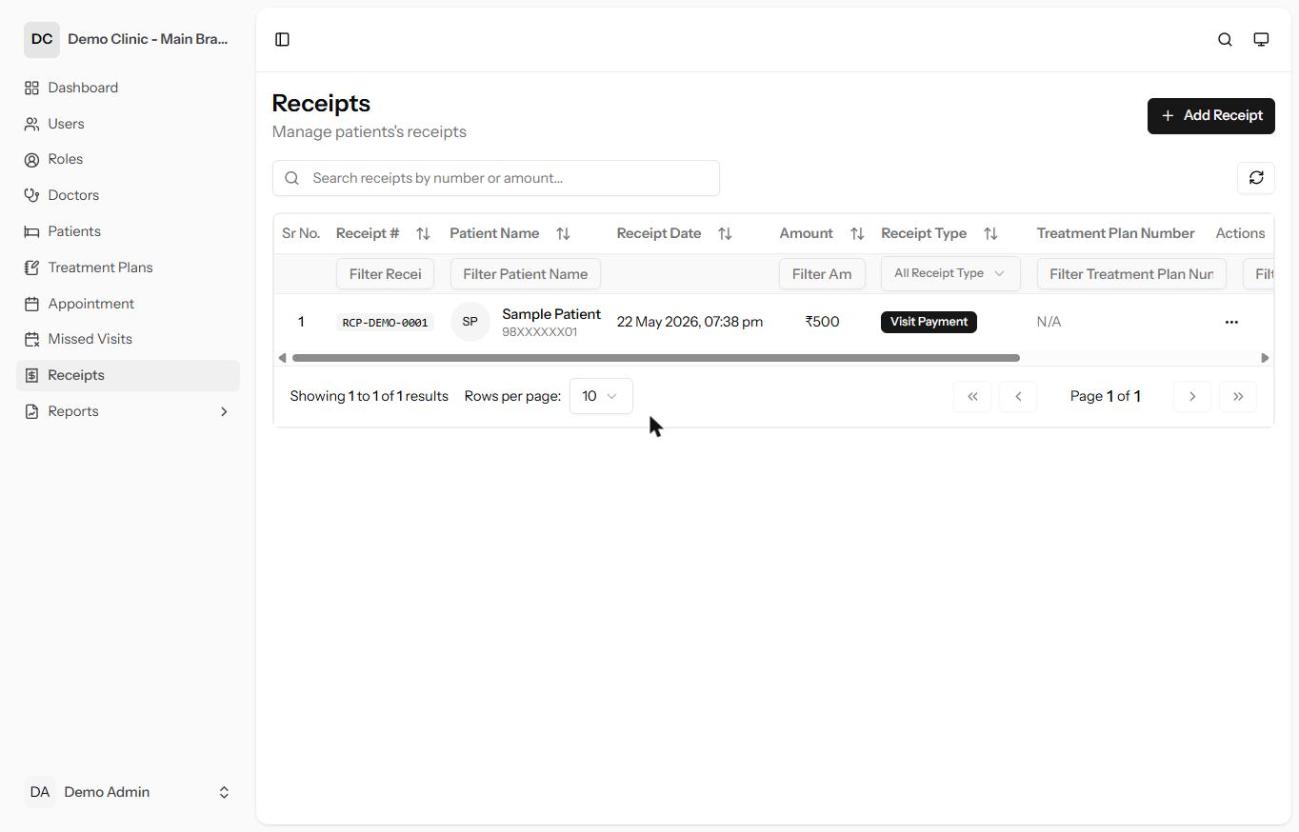
- Each receipt has a receipt number, patient, date, amount and receipt type.
- Receipts can be linked to a treatment plan number and a visit number.
- Search receipts by number or amount, and filter by receipt type.
- An Add Receipt button records a new payment.
The billing problems physiotherapy clinics describe
Without a clear system, sessions get delivered but never invoiced. Overdue payments pile up, and following up becomes a manual, uncomfortable process that nobody wants to own. Payments, schedules and records spread across different tools make this worse.
How billing works in Phyjio
- Deliver the session and record it against the patient's treatment plan.
- Create the invoice for that session, or for the whole package of sessions.
- Record payments as they arrive.
- Check the status: paid, partial or overdue.
What the billing features include
- Invoice generation per session or per treatment package.
- Payment status tracking across paid, partial and overdue invoices.
- Revenue reports by period, therapist or service type.
- Integration with standard payment methods.
From invoice to insight
Phyjio's revenue reports show expected versus received amounts, so you can see the gap between what is owed and what has come in. Learn more on the reports and analytics page, or read how to track payments in a physio clinic.
Receipts in Phyjio
Payments are recorded as receipts on a dedicated Receipts page. Each receipt is linked to the patient and, where relevant, to the treatment plan and the visit it relates to, so an amount is never just a number with no context.
| Column | What it records |
|---|---|
| Receipt # | A unique receipt number |
| Patient Name | Who paid |
| Receipt Date and Amount | When the payment was recorded and how much it was |
| Receipt Type | The kind of receipt; the list can be filtered by type |
| Treatment Plan Number and Visit Number | The plan and the visit the payment belongs to |
| Created At | When the receipt was created in the system |
Paid, partial and overdue
As described on phyjio.com, invoices can be tracked as paid, partial or overdue, so you can see at a glance who has settled in full, who has paid part of a package and who still owes. Invoices can be generated per session or per treatment package, which matches how most clinics actually charge.
- Per session: invoice each visit as it happens.
- Per package: invoice a course of sessions once and track payment against it.
- Outstanding: the dashboard and the appointments page both show an Outstanding figure, so unpaid balances are visible without opening a spreadsheet.
A weekly billing check-up
- Open the Receipts page and confirm every payment taken this week has a receipt.
- Look at the Outstanding figure and note which patients carry a balance.
- Compare the sessions delivered with the receipts issued to find any session that was never billed.
- Follow up on overdue balances while the visit is still fresh in the patient's mind.
- Run a revenue report for the week so you can compare expected and received amounts.
Why linking receipts to sessions matters
Unbilled sessions are one of the quietest ways a clinic loses money: the work is done, nobody invoices it and nobody notices. When a receipt carries the treatment plan number and the visit number, a gap between sessions delivered and money recorded is much easier to spot. It also makes patient questions easy to answer, because you can show exactly which visit a payment covered.
Frequently asked questions
Can I invoice a package of sessions?
Yes. Phyjio can generate invoices per session or per treatment package.
Can I see which invoices are overdue?
Yes. Phyjio tracks payment status across paid, partial and overdue invoices.
Does Phyjio show revenue by therapist?
Yes. Revenue reports can be viewed by period, therapist or service type.
Does Phyjio work with payment methods?
Phyjio lists integration with standard payment methods on its website.
Do I need a spreadsheet for billing?
No. Phyjio states that you can create invoices, track payments and see what is paid or pending without using spreadsheets.
Get paid without the confusion
Start a free trial with no credit card required, and get free onboarding support from the Phyjio team.
Start Free TrialBook a Demo