
Multi-Branch Physiotherapy Clinic Software
Add branches and therapy teams, schedule across locations and get a clinic-wide overview with Phyjio's multi-branch physiotherapy software.
Before you read on
Yes. You can add branches during setup, and Phyjio includes multi-branch scheduling support.
Yes. Each therapist manages their own schedule and patients, and you get a full clinic overview.
Yes. Phyjio offers daily, monthly and yearly reports, including revenue by period, therapist or service type.
Phyjio supports physiotherapy practices with more than one branch. You add your branches and therapy team when setting up, schedule appointments across branches with multi-branch scheduling support, and keep a full clinic overview through shared records and reports.
Key takeaways
- Branches and therapy teams are added during clinic setup.
- Multi-branch scheduling support.
- Each therapist has their own login; owners see the full clinic overview.
- Reports cover daily, monthly and yearly activity and revenue.
- Phyjio is a web application, so it runs in a browser.
See it in Phyjio
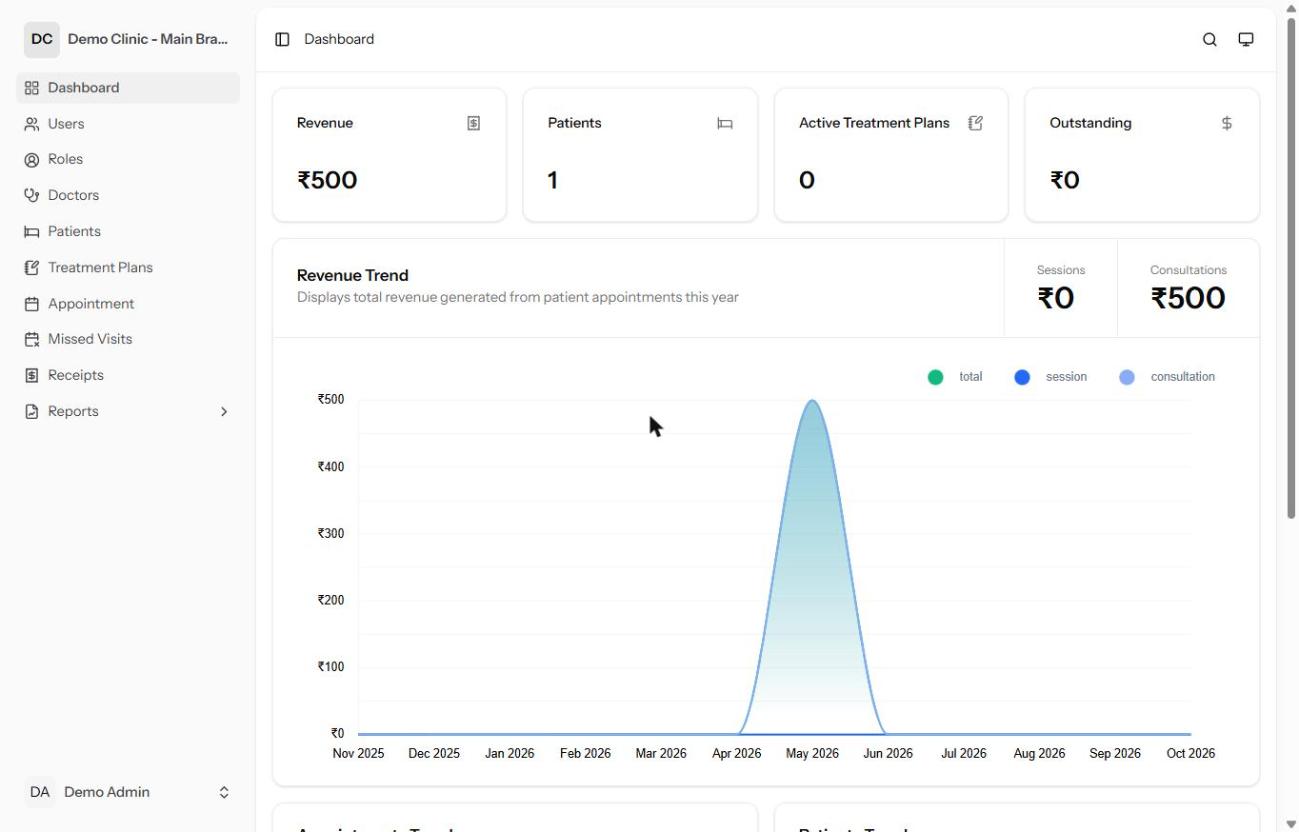
- Summary cards for Revenue, Patients, Active Treatment Plans and Outstanding.
- A Revenue Trend chart split into sessions and consultations.
- Appointments Trend and Patients Trend charts.
- Separate Patient Report and Revenue Report pages, generated by daily, monthly or yearly frequency and a start and end date.
Why multiple locations make admin harder
Every extra location multiplies the places where patient records, payments and schedules can drift apart. Phyjio is aimed at keeping them in one system.
What Phyjio offers for multi-branch practices
- Add clinic details, branches and therapy teams during setup.
- Multi-branch scheduling support in the appointment calendar.
- Therapist logins with an owner-level overview of the clinic.
- Reports for activity and revenue over time.
Next steps for growing practices
Phyjio describes itself as suited to solo practitioners through to multi-branch practices. Start a free trial to try the setup with your own branches and team, or book a demo to talk it through.
Setting up your branches
Phyjio's own setup steps begin with adding your clinic details, your branches and your therapy team, then defining services, session types and pricing. That means the structure of a multi-site practice is part of onboarding rather than something you bolt on later.
In the dashboard, the Doctors page records clinic name and city alongside each professional's name, email, phone and status. The Users and Roles pages let you control who can sign in and what they can do.
One system for every location
- Consistent records: every patient record uses the same sections, so a record looks the same whichever site created it.
- Consistent plans: treatment plans track the same columns of frequency, completed and remaining sessions.
- Consistent reporting: patient and revenue reports are generated from one set of data for any period you choose.
- Browser-based access: because Phyjio runs in a browser, staff at any site can reach the same system without installing software.
Questions to settle before you roll out
- Decide which people at each location need which permissions and map them to roles.
- Agree on naming conventions for treatment plans so titles read the same everywhere.
- Choose which reports each branch manager and the owner will review, and how often.
- Start with one branch, learn from it, then bring the others across.
- Ask for a demo if you need to see exactly how a particular multi-branch scenario would work.
What to look for in any multi-site system
Whatever software you choose, test the same four things: can you see the whole practice in one place, can you restrict what each person sees, are the records laid out identically across sites, and can the team learn it quickly. Phyjio is designed for clinical teams rather than IT departments, and phyjio.com says most practices are fully operational within a day. A demo is the best way to confirm it fits your own set-up.
Frequently asked questions
Does Phyjio support multiple branches?
Yes. You can add branches during setup, and Phyjio includes multi-branch scheduling support.
Can I see the whole clinic in one place?
Yes. Each therapist manages their own schedule and patients, and you get a full clinic overview.
Can I get reports across the clinic?
Yes. Phyjio offers daily, monthly and yearly reports, including revenue by period, therapist or service type.
Can I try it before committing?
Yes. There is a free trial with no credit card required.
Manage every branch from one system
Start a free trial with no credit card required, and get free onboarding support from the Phyjio team.
Start Free TrialBook a Demo