
Physiotherapy Clinic Reports & Analytics
Generate daily, monthly and yearly reports for your physiotherapy clinic: patient activity, revenue, expected vs received amounts and service breakdowns.
Before you read on
Phyjio provides daily, monthly and yearly reports, patient reports, revenue reports and a breakdown of consultations, sessions and free services.
Yes. Phyjio's revenue reports show expected versus received amounts.
Yes. Patient reports include appointment history, payments and outstanding balances.
Phyjio turns your clinic data into reports. You can generate daily, monthly and yearly reports covering patient activity, appointment history, payments, outstanding balances, and revenue with expected versus received amounts, plus a breakdown of consultations, sessions and free services.
Key takeaways
- Daily, monthly and yearly report generation.
- Patient reports show appointment history, payments and outstanding balances.
- Revenue reports compare expected and received amounts.
- Clear breakdown of consultations, sessions and free services.
- Reports adapt to your clinic's needs.
See it in Phyjio
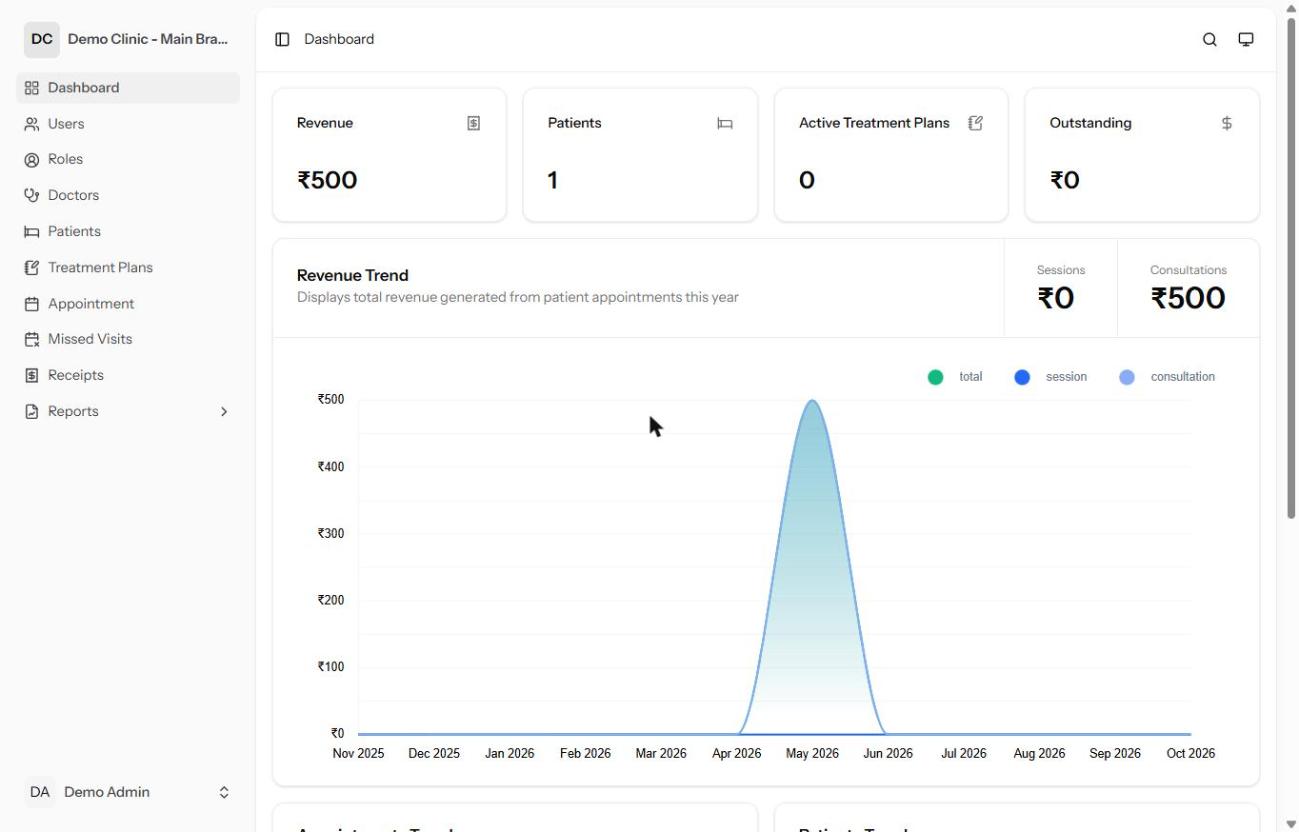
- Summary cards for Revenue, Patients, Active Treatment Plans and Outstanding.
- A Revenue Trend chart split into sessions and consultations.
- Appointments Trend and Patients Trend charts.
- Separate Patient Report and Revenue Report pages, generated by daily, monthly or yearly frequency and a start and end date.
What clinic owners can see
Phyjio's reports help you make informed decisions by tracking patient activity and revenue trends over time.
Reports available
| Report | What it shows |
|---|---|
| Daily, monthly, yearly | Reports generated for the period you choose |
| Patient report | Appointment history, payments and outstanding balances |
| Revenue report | Expected versus received amounts |
| Service breakdown | Consultations, sessions and free services |
Revenue views by period, therapist or service
Revenue can also be reviewed by period, therapist or service type. These views rely on the data captured through billing and invoicing and session tracking.
The two reports in Phyjio
Reports sit in their own menu in the Phyjio dashboard. Both work the same way: choose how often you want to report, set the start and end of the reporting period, and press Generate Report.
| Report | What it covers |
|---|---|
| Patient Report | Patient appointments, treatment plans, payments and outstanding amounts by date |
| Revenue Report | Revenue by date, including expected versus received amounts |
Phyjio describes the report frequency options as daily, monthly and yearly, so the same screen serves an end-of-day check and an annual review.
The dashboard at a glance
Before you open a report, the main dashboard already summarises the clinic. Four cards show Revenue, Patients, Active Treatment Plans and Outstanding. Beneath them, trend charts show revenue over the year (split into sessions and consultations), the number of appointments over time and the growth in patients.
- Revenue Trend: total revenue generated from patient appointments this year, with sessions and consultations shown separately.
- Appointments Trend: how busy the clinic has been month to month.
- Patients Trend: how the patient base is growing.
Questions your reports can answer
- How much did the clinic bill this month, and how much of that has actually been received?
- Which patients have an outstanding balance, and how large is it?
- How many consultations, sessions and free services did the clinic deliver in the period?
- Is revenue rising, flat or falling compared with the same time last year?
A monthly review habit
Reports are most useful when they are read on a schedule. A short monthly routine is enough: generate the revenue report for the month, generate the patient report for the same dates, compare expected and received amounts, and write down one thing to change next month. Because the data is entered during normal work, the review takes minutes rather than an afternoon of collecting figures.
Frequently asked questions
What reports does Phyjio provide?
Phyjio provides daily, monthly and yearly reports, patient reports, revenue reports and a breakdown of consultations, sessions and free services.
Can I compare expected and received revenue?
Yes. Phyjio's revenue reports show expected versus received amounts.
Can I see a patient's outstanding balance?
Yes. Patient reports include appointment history, payments and outstanding balances.
Can reports be split by therapist?
Yes. Revenue reports can be viewed by period, therapist or service type.
Make decisions from clear clinic data
Start a free trial with no credit card required, and get free onboarding support from the Phyjio team.
Start Free TrialBook a Demo