
Physiotherapy Patient Records Software
Keep patient profiles, intake forms, therapist notes, treatment plan templates and documents in one place with Phyjio. Start a free trial, no card needed.
Before you read on
It is software that keeps a physiotherapy clinic's patient information, session notes and treatment plans in one system instead of across paper files, spreadsheets and email.
Phyjio patient profiles hold medical history and intake forms. You can also record therapist notes per session and attach documents and reports to each patient.
Yes. Phyjio offers customisable treatment plan templates.
Phyjio stores every physiotherapy patient record in one system. That includes detailed profiles with medical history and intake forms, therapist notes for each session, customisable treatment plan templates, and attached documents and reports, so your team stops searching through paper files, spreadsheets and email threads.
Key takeaways
- Patient history, notes and treatment plans live in one place instead of paper files, Google Sheets and email.
- Profiles hold medical history and intake forms; every patient can have documents and reports attached.
- Therapist notes are documented per session and treatment plans start from customisable templates.
- Each therapist can have their own login, while the clinic owner keeps a full overview.
- Patient data is stored securely and is not shared with anyone.
See it in Phyjio
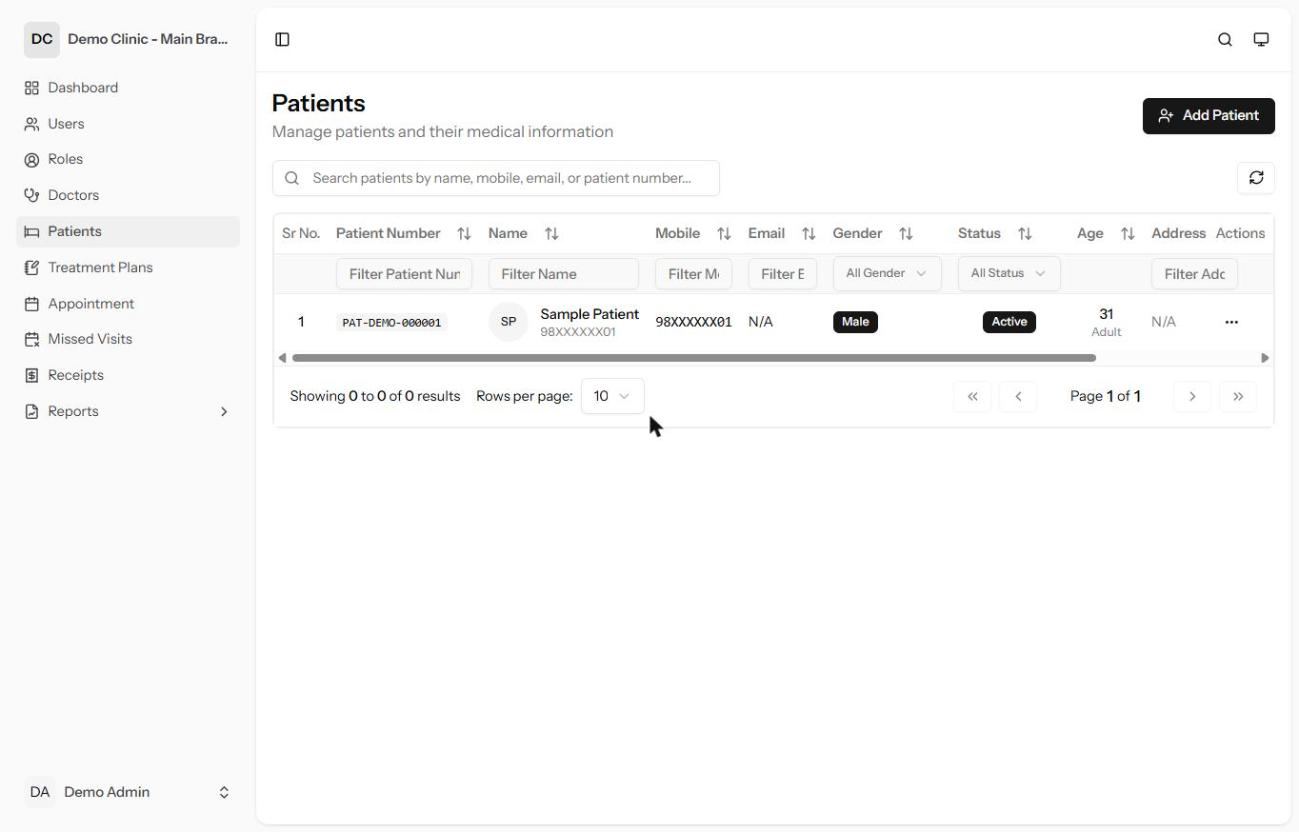
- Search patients by name, mobile, email or patient number.
- Each patient gets a patient number; the list shows name, mobile, email, gender, status, age and address.
- Filter the list by name, gender and status.
- An Add Patient button opens a new record.
Why scattered patient records slow a physiotherapy clinic
Many clinics keep patient history, notes and treatment plans across paper files, Google Sheets and email threads. When a patient arrives, finding the right information quickly becomes the hard part. Records kept in several places are also easy to lose track of.
Phyjio replaces that with one record per patient that the right people in your clinic can open at any time.
What a Phyjio patient record includes
- Detailed patient profile: medical history and intake forms in the patient's profile.
- Therapist notes: notes and progress documentation recorded per session.
- Treatment plans: customisable treatment plan templates, so common plans do not have to be rewritten each time.
- Documents and reports: files and reports can be attached to each patient.
How patient records connect to the rest of your clinic
A record in Phyjio is not an isolated file. Every patient record is linked from the first session, so appointments, session progress, invoices and payments sit alongside the clinical notes. You can read more about session and progress tracking and billing and invoicing.
Who can see patient records
Phyjio supports multiple therapists, and each therapist can have their own login to manage their schedule and patients. The clinic owner gets a full clinic overview.
How to get your patients into Phyjio
At the moment you add patient data manually. The Phyjio team states that making it easier to import existing records is planned for an upcoming update. Setting up your clinic details and starting to add patients is described as something most clinics can do within a day.
Every field in the Phyjio patient form
When you add a patient in the Phyjio dashboard, the form is organised into sections so that nothing important is left out and nothing is buried in a free-text box. Fields marked required must be filled before the record can be created; everything else can be added now or later.
| Section | What you can record |
|---|---|
| Patient Information | Full name (required), mobile number (required), email, gender (required), age (required), date of birth, patient photo, and an Active switch |
| Address Information | Country, state, city, pincode and full address |
| Referral & Marketing | "How did you find us?" (required) |
| Emergency Contact | Emergency contact name and number |
| Medical Information | Medical history and allergies |
| Other Details | Occupation |
| Additional Notes | Free-text notes for anything that does not fit elsewhere |
Find any patient in seconds
The Patients page lists every record in one table, so you never open a folder or scroll a sheet to find someone. The table shows the patient number, name, mobile, email, gender, status, age, address and the date the record was created.
- Search: type a name, mobile number, email or patient number into the search bar at the top of the page.
- Column filters: filter by patient number, name, mobile, email or address directly under the column headings.
- Dropdown filters: narrow the list by gender or by status.
- Sorting and paging: sort by any column and choose how many rows to show per page.
- Patient number: every patient gets a unique patient number when the record is created, so two people with the same name are never confused.
Active and inactive patients
Each record has an Active switch labelled "patient can receive appointments". Keeping it on means the patient can be booked in as normal. Turning it off marks the patient as inactive in the list, which keeps your working list tidy without deleting anyone's history. Because status is a column you can filter on, you can look at only active patients during the day and review inactive ones when you plan follow-ups.
Why record where a patient found you
The required "How did you find us?" question is part of the registration form, so the answer is captured at the moment the patient is added rather than reconstructed later. Over time it gives the clinic a record of which referrals and channels bring people through the door, which is useful when you decide where to spend your time on marketing.
Frequently asked questions
What is physiotherapy patient records software?
It is software that keeps a physiotherapy clinic's patient information, session notes and treatment plans in one system instead of across paper files, spreadsheets and email.
What can I store in a Phyjio patient profile?
Phyjio patient profiles hold medical history and intake forms. You can also record therapist notes per session and attach documents and reports to each patient.
Can I use treatment plan templates?
Yes. Phyjio offers customisable treatment plan templates.
Can I import my existing patient data?
Currently you can add patient data manually. Phyjio says easier import of existing records is being worked on for an upcoming update.
Is patient data safe in Phyjio?
Phyjio states that your data is stored securely and protected, that it follows standard data protection practices, and that it does not share your data with anyone.
Can multiple therapists use the same system?
Yes. Each therapist can have their own login and manage their schedule and patients, while the owner gets a full clinic overview.
Bring every patient record into one place
Start a free trial with no credit card required, and get free onboarding support from the Phyjio team.
Start Free TrialBook a Demo