
Physiotherapy Appointment Scheduling Software
Book appointments, assign therapists, manage availability and waitlists, and send SMS and email reminders with Phyjio's physiotherapy scheduling.
Before you read on
Yes. Phyjio sends automated appointment reminders by SMS and email.
Yes. Phyjio has a therapist-level calendar view with availability management.
Yes. Phyjio includes waitlist management for popular appointment slots.
Phyjio manages physiotherapy appointments in one calendar. You book patient appointments, assign them to the right therapist, manage each therapist's availability, and send automated reminders by SMS and email before each appointment, with a waitlist for popular slots.
Key takeaways
- Therapist-level calendar view with availability management.
- Multi-branch scheduling support.
- Automated appointment reminders via SMS and email.
- Waitlist management for popular appointment slots.
- A clean, conflict-free daily calendar for the clinic.
See it in Phyjio
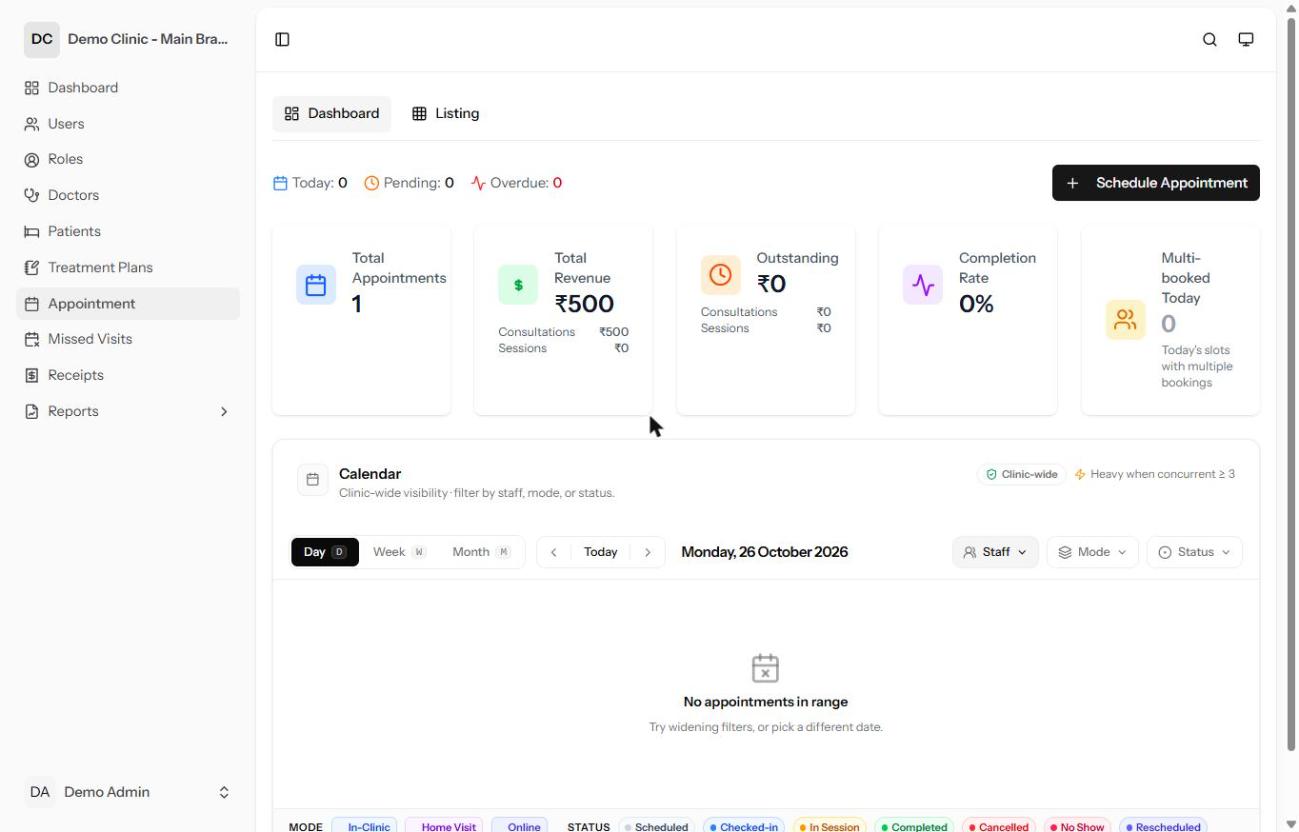
- Counters for Today, Pending and Overdue appointments, with a Schedule Appointment button.
- A clinic-wide calendar with Day, Week and Month views, filterable by staff, mode and status.
- Appointment modes: In-Clinic, Home Visit and Online.
- Statuses: Scheduled, Checked-in, In Session, Completed, Cancelled, No Show and Rescheduled.
Why phone and calendar-app scheduling causes problems
Appointment management done by phone and separate calendar apps can lead to double bookings, missed appointments and wasted therapist time during the day.
What Phyjio scheduling includes
- Book appointments and assign them to the right therapist.
- A therapist-level calendar view with availability management.
- Multi-branch scheduling support.
- Automated reminders by SMS and email before each appointment.
- Waitlist management for popular appointment slots.
How reminders help
Phyjio sends automated reminders before each appointment so patients show up and therapist time is not wasted. For a deeper look at the problem, see how to reduce physiotherapy no-shows.
Scheduling for one therapist or many
Each therapist can have their own login to manage their own schedule and patients, and the clinic owner sees the full clinic overview. If you run more than one location, read about multi-branch clinic software.
Calendar and listing views
The Appointment page in the Phyjio dashboard gives you two ways to look at the same bookings. The calendar view has Day, Week and Month layouts and a Today button, so you can zoom from this afternoon to the whole month. The Listing view shows the same appointments as a table when you want to scan or filter rather than browse a grid.
- Filter by staff: see one therapist's day without the rest of the clinic in the way.
- Filter by mode: separate appointments by how they are delivered.
- Filter by status: focus on what is booked, completed or needs attention.
- Summary cards: Total Appointments, Total Revenue, Outstanding and Completion Rate sit at the top of the page, so you can read the state of the diary in a glance.
Reminders and waitlists
According to phyjio.com, automated reminders go out before each appointment by SMS and email, so patients are reminded without anyone at the front desk making calls. Phyjio also includes waitlist management: when a slot opens, a patient who is waiting can be offered it instead of the time going empty.
Both features target the same problem, wasted therapist time. Reminders reduce the chance that a booked slot is missed, and a waitlist gives you a way to refill a slot that does open up.
A daily front-desk routine
- Open the Appointment page on the Today view and scan the day for gaps and overlaps.
- Check the status of each booking so you know who has arrived and who has not.
- Offer any freed slot to a waiting patient.
- Once a patient is seen, update the appointment so the Completion Rate stays accurate.
- Before closing, glance at next day's view and make sure each therapist's list looks realistic.
Why a shared calendar beats phone-and-notebook booking
When appointments live in one system, every person who books is looking at the same diary. That removes the most common source of double bookings: two people promising the same slot from two different places. It also means a therapist can check their own schedule without calling the desk, and the clinic can see how busy each week really is.
Frequently asked questions
Does Phyjio send appointment reminders?
Yes. Phyjio sends automated appointment reminders by SMS and email.
Can I manage each therapist's availability?
Yes. Phyjio has a therapist-level calendar view with availability management.
Does Phyjio support a waitlist?
Yes. Phyjio includes waitlist management for popular appointment slots.
Can I schedule across several branches?
Yes. Phyjio supports multi-branch scheduling.
Can I book and assign appointments in one place?
Yes. You can book appointments, assign therapists and manage your daily schedule in one place.
Keep your clinic calendar clean and conflict-free
Start a free trial with no credit card required, and get free onboarding support from the Phyjio team.
Start Free TrialBook a Demo