How Does AI-Powered Patient Scheduling Cut No-Shows Automatically?
Published: September 15, 2026 Last updated: September 15, 2026
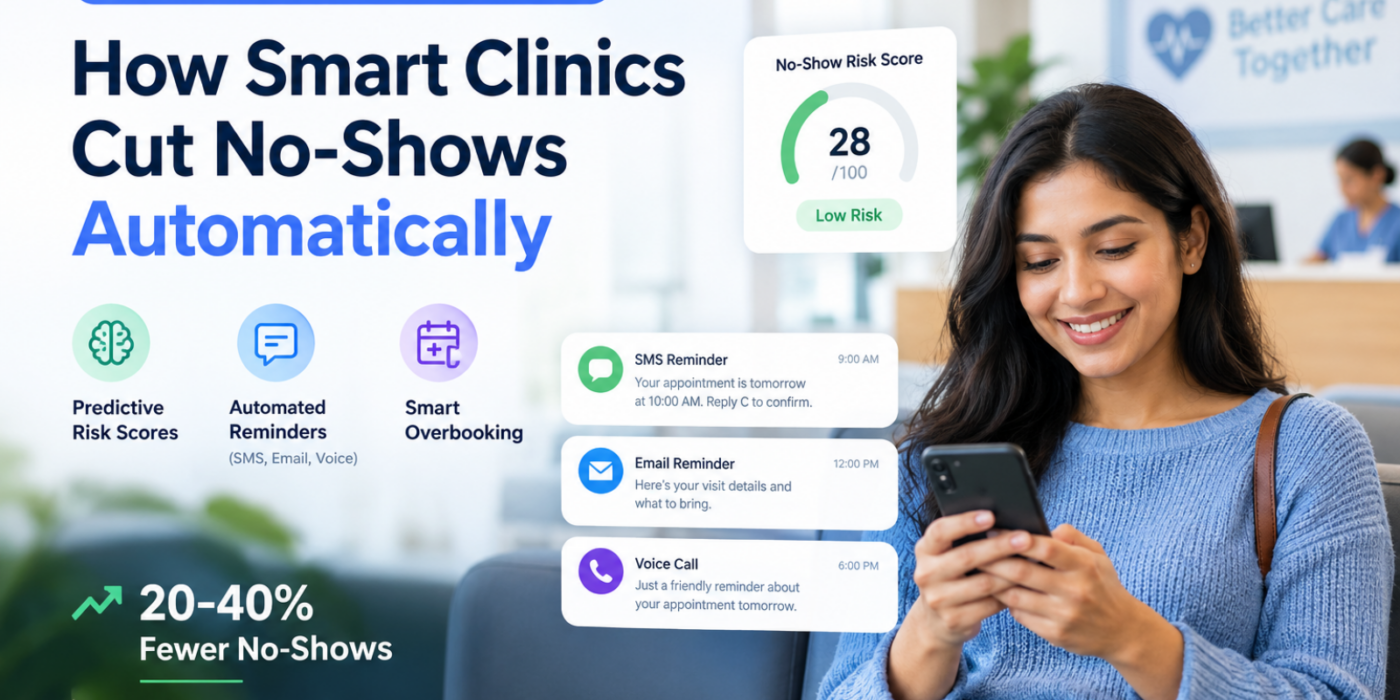
Quick answer: AI-powered patient scheduling cuts no-shows by 20–40% by combining predictive risk scoring, automated multi-channel reminders (SMS, email, voice), and dynamic overbooking that fills predicted gaps before they happen — typically dropping a clinic’s no-show rate from an industry average of 18–30% down to 8–15% within 3–6 months of rollout.
Why Does This Matter for Clinics?
Missed appointments are one of the largest silent revenue leaks in outpatient care. The average U.S. medical practice loses between $150 and $200 per empty slot once staff time, room overhead, and lost billing opportunity are factored in. For a mid-sized clinic seeing 100 patients a day, a no-show rate of even 20% translates to roughly $3,000–$4,000 in lost daily capacity — or $750,000-plus a year across a five-day week.
No-shows aren’t random. They cluster around predictable variables: long lead times between booking and visit date, early-morning or Monday appointments, first-time patients, and patients without a prior relationship with the provider. Traditional scheduling systems treat every patient the same, sending one generic reminder call or text regardless of how likely that specific person is to skip the visit. AI-powered scheduling systems instead assign each patient a individualized no-show risk score, then tailor the reminder cadence, channel, and even appointment slot buffer to that score.
What Causes Patients to Miss Appointments?
Understanding the “why” behind no-shows is what makes AI intervention effective rather than just automated. The most commonly cited drivers, based on aggregated healthcare operations research, include:
-
Long scheduling lead time. Appointments booked more than 14 days out have a no-show rate roughly 2–3x higher than those booked within 48 hours.
-
Transportation and distance barriers. Patients living more than 15 miles from a clinic show a measurably higher no-show rate, particularly in rural and low-income areas.
-
Lack of perceived urgency. Routine follow-ups and preventive visits see higher no-show rates (20–35%) than acute or symptomatic visits (5–12%).
-
Forgotten appointments. Roughly 30–40% of no-show patients report simply forgetting, especially when only one reminder was sent.
-
Financial or insurance uncertainty. Patients unsure about copay amounts or coverage are more likely to skip a visit rather than call and ask.
-
Competing obligations. Work schedules, childcare, and lack of paid time off disproportionately affect no-show rates among working-age adults.
AI systems don’t eliminate these root causes, but they compensate for them — closing the gap between “patient intended to come” and “patient actually showed up” through better-timed, better-targeted communication.
The True Cost of a No-Show
It helps to break the $150–$200 average figure into its components, because this is what justifies the cost of an AI platform later in this article:
-
Lost provider time: A 20–30 minute slot billed at an average outpatient rate represents $80–$120 in unrealized revenue per no-show.
-
Staff overhead: Front-desk and clinical staff time spent prepping for a visit that doesn’t happen adds another $20–$40 per instance.
-
Opportunity cost: That slot could have gone to another patient, especially relevant in specialties with 3–6 week backlogs, where a single no-show can mean a patient in genuine need waits an extra month.
-
Downstream cost: Patients who no-show for follow-up care are statistically more likely to be readmitted or present later with a more advanced condition, which raises costs elsewhere in the system.
How Do Traditional and AI Scheduling Compare?
|
Feature |
Traditional Scheduling |
AI-Powered Scheduling |
|---|---|---|
|
Reminder method |
1 phone call, 24–48 hrs prior |
SMS + email + voice, 3–5 touchpoints |
|
No-show prediction |
None |
Risk score per patient (0–100) |
|
Overbooking |
Manual, rule-of-thumb |
Dynamic, based on predicted gaps |
|
Rebooking waitlist |
Manual staff outreach |
Automated waitlist fill in under 10 min |
|
Personalization |
Generic script for all patients |
Message timing/channel tailored by risk score |
|
Typical no-show rate |
18–30% |
8–15% |
|
Staff hours/week on scheduling |
15–25 hrs |
4–8 hrs |
|
Time to fill a cancellation |
2–6 hours (manual calling) |
5–10 minutes (automated) |
|
Reporting/analytics |
Manual spreadsheet tracking |
Real-time dashboard, auto-updated |
How Do Costs Compare by Clinic Size?
|
Clinic Size |
Providers |
Est. Monthly Platform Cost |
Est. Monthly No-Show Revenue Recovered |
Payback Period |
|---|---|---|---|---|
|
Solo practice |
1 |
$200–$350 |
$1,500–$3,000 |
2–4 weeks |
|
Small group |
2–5 |
$800–$2,000 |
$6,000–$15,000 |
3–6 weeks |
|
Mid-size clinic |
6–15 |
$2,500–$6,000 |
$18,000–$45,000 |
1–2 months |
|
Large multi-site |
16+ |
$6,500–$20,000+ |
$50,000–$150,000+ |
1–2 months |
These figures assume a starting no-show rate near the 18–30% industry average and a reduction into the 8–15% range within the first two quarters.
How Does AI Actually Predict Which Patients Will No-Show?
AI scheduling tools generally rely on a supervised machine learning model trained on historical appointment data. The model looks for patterns across dozens of variables simultaneously rather than relying on a single rule like “call everyone the day before.” Common inputs include:
-
Historical attendance rate — has this specific patient no-showed before, and how often?
-
Appointment lead time — how many days between booking and the visit?
-
Appointment type — routine, follow-up, new patient, or urgent?
-
Time and day of week — Monday mornings and post-holiday slots see elevated risk.
-
Distance/transportation — commute time or ZIP code-level transportation access.
-
Communication responsiveness — did the patient confirm, ignore, or reschedule prior reminders?
-
Insurance/payment type — self-pay and high-deductible plans show measurably higher no-show rates in aggregate data.
-
Age and demographic patterns — younger adults (18–34) show higher no-show rates than seniors (65+) in most specialties.
The model outputs a score, usually normalized to 0–100, where a score above roughly 60 is treated as “high risk.” Clinics then apply different intervention rules by tier — for example, low-risk patients get a single SMS, while high-risk patients get an SMS, an email, and a live confirmation call.
How Do Clinics Implement AI Scheduling to Reduce No-Shows?
-
Audit current no-show data. Pull 6–12 months of appointment history to establish a baseline rate and identify peak no-show days, times, and appointment types.
-
Set a measurable target. Define a specific goal — for example, “reduce no-show rate from 24% to 12% within 6 months” — so the rollout has a clear benchmark.
-
Connect the AI platform to your EHR. Integrate via API so patient history, insurance, and appointment type feed the prediction model automatically rather than requiring manual data entry.
-
Clean and standardize patient contact data. Verify phone numbers and email addresses; a scheduling AI is only as effective as the reachability of its contact list, and outdated numbers can account for 10–15% of “failed” reminders.
-
Set risk-score thresholds. Flag patients scoring above roughly 60/100 as high-risk for an extra reminder touchpoint or a live confirmation call rather than an automated text alone.
-
Automate tiered reminders. Send an email at 7 days out, an SMS at 48 hours, and a voice or SMS confirmation request at 24 hours, adjusting frequency by risk tier.
-
Enable two-way confirmation. Let patients reply “C” to confirm or “R” to reschedule directly from the text, which reduces phone-tag and front-desk call volume by up to 30%.
-
Enable dynamic overbooking. Let the system add 1–2 predicted-gap appointments per provider per day based on real-time risk scores, rather than a flat overbooking rule applied to every slot.
-
Activate the digital waitlist. Automatically text open slots to waitlisted patients when a cancellation occurs, filling gaps in under 10 minutes on average instead of hours of manual calling.
-
Review performance monthly. Track no-show rate, reminder response rate, and revenue recovered; retrain the model’s thresholds quarterly as your patient population and scheduling patterns shift.
Common Implementation Pitfalls to Avoid
-
Over-messaging patients. More than 5–6 touchpoints per appointment tends to trigger opt-outs rather than improve attendance.
-
Ignoring language and accessibility needs. Clinics serving non-English-speaking populations see the biggest gains when reminders are sent in the patient’s preferred language.
-
Failing to train front-desk staff. Staff need to understand how the risk score works so they can manually override it for patients they know personally — the AI supplements human judgment, it doesn’t replace it.
-
Skipping the baseline audit. Clinics that skip Step 1 often can’t prove ROI later because they have no “before” number to compare against.
-
Treating overbooking as a blunt instrument. Overbooking every slot by a fixed percentage — rather than dynamically, based on predicted risk — creates provider overtime and patient wait-time complaints.
What Reminder Channels Work Best, and When?
Not all reminder channels perform equally, and the right mix depends on patient demographics and lead time.
|
Channel |
Best Used At |
Typical Response/Confirmation Rate |
|---|---|---|
|
|
5–7 days before |
25–35% |
|
SMS/text |
24–72 hours before |
55–70% |
|
Automated voice call |
24 hours before, for high-risk patients |
40–50% |
|
Live staff call |
Same-day, for highest-risk patients only |
60–75% |
|
Patient portal push notification |
48 hours before, for portal-active patients |
30–45% |
SMS consistently outperforms email and generic voicemail because it requires no login and can be read in under 5 seconds. However, voice calls remain important for older patient populations (65+), who show text response rates roughly 15–20 percentage points lower than patients under 45.
What Does a Realistic 6-Month Rollout Look Like?
A generalized rollout timeline, based on common vendor implementation patterns, looks like this:
-
Weeks 1–2: Data audit, EHR integration, contact list cleanup.
-
Weeks 3–4: Staff training, risk-tier configuration, pilot with 1–2 providers.
-
Month 2: Full clinic rollout; expect a 5–10 percentage point drop in no-show rate as reminder automation alone takes effect.
-
Month 3: Enable dynamic overbooking and waitlist automation; expect an additional 5–10 point drop as predictive scheduling kicks in.
-
Months 4–6: Model retraining based on clinic-specific data; no-show rate typically stabilizes in the 8–15% range.
Clinics that skip straight to full automation without a pilot phase report roughly 30% more front-desk friction in the first month, since staff haven’t yet learned to interpret and override risk scores when needed.
How Do No-Show Rates Vary by Medical Specialty?
No-show behavior isn’t uniform across specialties — visit urgency, appointment frequency, and typical patient population all shift the baseline rate. Clinics benchmarking their own performance should compare against their specific field rather than a generic average.
|
Specialty |
Typical Baseline No-Show Rate |
Typical Rate After AI Scheduling |
Primary Driver |
|---|---|---|---|
|
Primary care |
20–25% |
10–13% |
Long lead times, routine visits |
|
Behavioral health/psychiatry |
25–40% |
15–22% |
Stigma, low perceived urgency, high visit frequency |
|
Dermatology |
15–20% |
7–10% |
Long lead times (4–8 weeks common) |
|
Dental |
12–18% |
6–9% |
Cost concerns, low urgency for routine cleanings |
|
Physical therapy |
20–30% |
10–15% |
High visit frequency, scheduling fatigue |
|
Pediatrics |
10–15% |
5–8% |
Generally lower due to parental follow-through |
|
OB-GYN |
15–20% |
7–11% |
Mixed urgency across visit types |
|
Specialty/surgical follow-up |
8–12% |
4–6% |
High perceived urgency, lower baseline already |
Behavioral health consistently shows the highest no-show rates of any specialty, largely because appointment frequency is high (often weekly) and the perceived urgency of any single visit is lower than, say, a surgical follow-up. This is also the specialty segment that tends to see the largest relative improvement from AI scheduling, since even modest reminder personalization meaningfully changes attendance for high-frequency visit types.
How Should a Clinic Choose an AI Scheduling Platform?
Not all AI scheduling vendors are built the same way, and the right choice depends heavily on clinic size, EHR system, and patient population. When evaluating vendors, weigh the following criteria:
-
EHR compatibility. Confirm the platform has a pre-built integration for your specific EHR (Epic, Cerner, athenahealth, eClinicalWorks, etc.) rather than relying on manual data exports, which reintroduce the delays AI scheduling is meant to eliminate.
-
HIPAA compliance and BAA availability. Any vendor handling patient contact information and appointment data must be willing to sign a Business Associate Agreement; treat refusal as an immediate disqualifier.
-
Multi-language support. If more than 10–15% of your patient population speaks a language other than English at home, confirm the platform supports automated reminders in that language.
-
Two-way texting capability. Platforms that only send one-way reminders miss the 55–70% confirmation-rate benefit that comes from letting patients confirm or reschedule directly by replying to a text.
-
Transparent pricing model. Understand whether pricing is per-provider, per-message, or a flat clinic-wide fee — per-message pricing can become unpredictable for high-volume clinics sending 500+ reminders a day.
-
Reporting granularity. Look for dashboards that break down no-show rate by provider, appointment type, and day of week, not just a single clinic-wide number.
-
Contract flexibility. Favor month-to-month or short-term contracts during the first 3–6 months so you can evaluate real ROI before committing to an annual agreement.
-
Customer support responsiveness. Ask for average support ticket response time; scheduling issues that go unresolved for more than 24 hours can directly translate into missed revenue.
How Do You Calculate ROI From AI Scheduling?
A simple formula clinics can use to estimate monthly ROI:
Monthly Revenue Recovered = (Baseline No-Show Rate − New No-Show Rate) × Monthly Appointment Volume × Average Revenue per Visit
For example, a clinic with 2,000 monthly appointments, an average revenue of $120 per visit, and a no-show rate reduction from 24% to 12% would calculate:
(0.24 − 0.12) × 2,000 × $120 = $28,800 in monthly revenue recovered
Subtracting a typical platform cost of $2,500–$6,000/month for a mid-size clinic still leaves a net monthly gain in the $22,000–$26,000 range — which is why payback periods for most clinics fall within 1–2 months, as shown in the cost comparison table above.
It’s worth noting this formula captures direct revenue recovery only. It doesn’t account for downstream savings like reduced provider idle time, reduced staff overtime spent on manual rebooking calls, or the clinical benefit of patients staying on track with preventive and follow-up care — all of which further improve the real-world ROI beyond the raw dollar figure.
What Metrics Should Clinics Track After Rollout?
Measuring success requires more than just watching the overall no-show rate drop. Clinics that get the most value from AI scheduling typically monitor a small set of metrics monthly:
-
No-show rate by provider — isolates whether certain providers’ patient panels need different intervention thresholds.
-
No-show rate by appointment type — routine vs. urgent vs. new-patient visits behave differently and may need separate risk models.
-
Reminder response/confirmation rate — a declining confirmation rate over time can signal reminder fatigue or opt-outs.
-
Time-to-fill for cancellations — tracks how quickly the waitlist automation converts a cancellation into a filled slot.
-
Front-desk call volume — a strong indicator of whether two-way texting is successfully deflecting phone-based rescheduling.
-
Net revenue recovered — the bottom-line figure calculated using the ROI formula above, tracked monthly against the platform’s cost.
Reviewing these six metrics together, rather than in isolation, helps distinguish a platform that’s working well from one that’s simply sending more messages without improving attendance.
Frequently Asked Questions
How much can AI scheduling actually reduce no-shows? Most clinics see a 20–40% relative reduction, moving from an average no-show rate of 18–30% down to roughly 8–15% within the first 3–6 months of consistent use.
Is AI scheduling expensive for a small practice? Pricing for AI scheduling platforms typically runs $200–$800 per provider per month, which most small practices recoup within 1–2 months through recovered appointment slots.
Does AI scheduling replace front-desk staff? No — it typically reduces manual scheduling work by 60–70%, freeing staff to handle complex cases, insurance questions, and in-person check-in instead of routine reminder calls.
What data does the AI need to predict no-shows accurately? At minimum it needs appointment history, lead time between booking and visit date, patient age, and prior no-show or cancellation records; adding distance-to-clinic and insurance type improves accuracy further.
How fast do clinics see results after implementation? Reminder-driven improvements usually appear within 2–4 weeks, while predictive overbooking and waitlist automation typically show their full effect by month 3.
Does overbooking cause longer patient wait times? Not when it’s dynamic rather than fixed — because the system only adds slots where a no-show is statistically predicted, most clinics report wait-time increases of under 5 minutes on average, compared to 15–20 minutes with flat-rate overbooking.
Can AI scheduling work with an older or less common EHR system? Most modern platforms integrate via API with major EHRs, but older or highly customized systems may need a middleware connector, which can add 1–3 weeks to the implementation timeline.
Is patient data safe with an AI scheduling platform? Reputable platforms are HIPAA-compliant and use encrypted data transmission; clinics should confirm a signed Business Associate Agreement (BAA) is in place before connecting any patient data.
Will patients find automated reminders impersonal? Most patients report neutral-to-positive reactions when reminders are well-timed and allow two-way replies; complaints rise sharply only when message frequency exceeds 5–6 touchpoints per single appointment.
What happens if a patient doesn’t have a smartphone or reliable cell service? Platforms typically fall back to automated voice calls or a live staff call for patients without confirmed SMS reachability, which is why maintaining accurate contact-type data per patient matters during setup.
Can AI scheduling reduce no-shows for behavioral health specifically? Yes — behavioral health sees some of the largest relative gains, often dropping from a 25–40% baseline to 15–22%, because high visit frequency means even small per-visit improvements compound significantly over a course of treatment.
What’s Next for AI-Powered Scheduling?
The current generation of AI scheduling tools focuses primarily on prediction and reminder automation, but the next wave of development is shifting toward two additional capabilities worth watching.
Conversational rescheduling is emerging as an extension of two-way texting, where patients can negotiate a new time directly through a natural-language chat interface rather than picking from a fixed list of open slots. Early implementations report reschedule completion rates of 70–80% compared to 40–50% for static “pick a time” links, since patients don’t have to leave the conversation to complete the action.
Cross-clinic waitlist pooling is also gaining traction in larger health systems, where a cancellation at one location can be offered to waitlisted patients at a nearby sister clinic if the original location has no eligible waitlist match. Systems piloting this approach report an additional 3–5 percentage point improvement in overall slot utilization across their network, on top of the gains from single-location automation described earlier in this article.
Neither capability changes the core mechanics described in the implementation steps above — both build on the same foundation of accurate risk scoring, clean contact data, and two-way communication that makes basic AI scheduling effective in the first place.
Key Takeaways
-
AI scheduling cuts no-shows by 20–40%, moving clinics from an 18–30% baseline down to an 8–15% rate.
-
Missed appointments cost clinics $150–$200 per empty slot, or roughly $3,000–$4,000/day for a 100-patient practice.
-
Multi-channel reminders (SMS, email, voice) at 7 days, 48 hours, and 24 hours outperform a single phone call, with SMS confirmation rates of 55–70%.
-
Dynamic overbooking and automated waitlists fill cancellations in under 10 minutes on average, versus 2–6 hours manually.
-
Platforms cost $200–$800 per provider/month for small practices and typically pay for themselves within 1–2 months.
-
Full ROI (8–15% no-show rate) generally takes 3–6 months, following a phased rollout: reminders first, then predictive overbooking and waitlist automation.
-
No-show rates and results vary meaningfully by specialty, with behavioral health seeing both the highest baseline rates (25–40%) and among the largest relative improvements after implementation.
-
Choosing the right platform matters as much as the technology itself — EHR compatibility, two-way texting, and a signed BAA should be non-negotiable evaluation criteria before signing a contract.
A Practical Summary for Decision-Makers
For a clinic administrator evaluating whether AI scheduling is worth the investment, the math is generally straightforward: if your current no-show rate sits above 15%, the potential monthly revenue recovery almost always exceeds the platform’s monthly cost within the first two billing cycles, based on the ROI formula outlined earlier. The bigger determinant of success isn’t the software itself but the quality of the rollout — clean contact data, a phased implementation with a pilot period, and staff trained to interpret (and occasionally override) the AI’s risk scores. Clinics that treat the technology as a full replacement for front-desk judgment, rather than a tool that augments it, tend to see smaller gains than the 20–40% range cited throughout this article.