How to Track Payments in a Physio Clinic
Stop unbilled sessions and overdue payments. Learn how to track paid, partial and overdue invoices in a physiotherapy clinic using Phyjio.
Before you read on
Phyjio tracks payment status across paid, partial and overdue invoices, and patient reports show outstanding balances.
Yes. Phyjio tracks partial payments as a payment status.
Invoice each session or package after delivery. Phyjio is built so invoices follow sessions rather than being managed separately.
Track every session from delivery to payment. Invoice each session or treatment package, record payments as they come in, and check which invoices are paid, partially paid or overdue. Phyjio keeps these steps in one system so sessions are not delivered and then forgotten.
Key takeaways
- Unbilled sessions and overdue payments are common when billing is spread across tools.
- Phyjio generates invoices per session or per treatment package.
- Payment status is tracked as paid, partial or overdue.
- Revenue reports show expected versus received amounts.
- No spreadsheet is needed.
See it in Phyjio
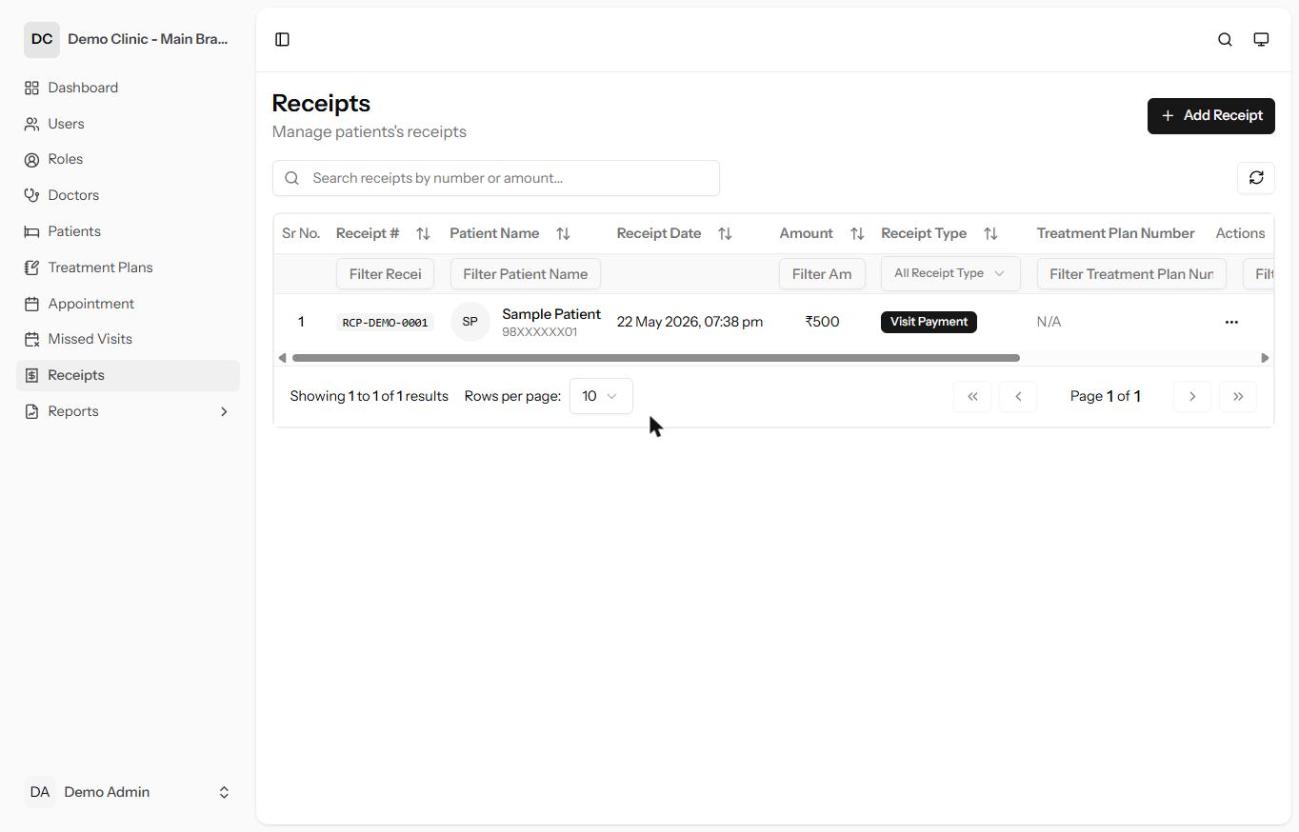
- Each receipt has a receipt number, patient, date, amount and receipt type.
- Receipts can be linked to a treatment plan number and a visit number.
- Search receipts by number or amount, and filter by receipt type.
- An Add Receipt button records a new payment.
Where physio clinic payments go wrong
Without a clear system, sessions get delivered but never invoiced, overdue payments pile up, and following up becomes a manual, uncomfortable job that nobody wants to own.
A simple payment tracking routine
- Invoice each session, or the whole package, after delivery.
- Record every payment, including part payments.
- Review overdue invoices on a regular basis.
- Compare expected and received amounts in your revenue report.
Doing this in Phyjio
Phyjio provides invoice generation, payment status tracking and revenue reports in one place. Read about Phyjio billing and invoicing or the reports available.
Receipts and outstanding balances
Phyjio tracks money in two places that work together. The Receipts page lists each payment with its receipt number, patient, date, amount, receipt type, treatment plan number and visit number. The dashboard and the Appointment page both show an Outstanding figure, so you can see how much is still owed without adding up a spreadsheet.
Paid, partial and overdue at a glance
phyjio.com describes payment status tracking across paid, partial and overdue invoices, with invoices generated per session or per treatment package. That distinction matters: a package may be partly paid while the course is still running, and a single session may be overdue by the next visit.
- See who has settled in full.
- See who has paid part of a package.
- See which invoices are overdue and need a follow-up.
Using reports to follow the money
The Patient Report shows appointments, treatment plans, payments and outstanding amounts by date, which makes it the natural tool for chasing balances. The Revenue Report shows revenue by date and compares expected with received amounts, so a gap between the two is visible immediately.
A month-end close checklist
- Confirm every session delivered this month has been invoiced.
- Check that every payment taken has a receipt linked to the right plan and visit.
- Generate the revenue report for the month and compare expected with received.
- List patients with an outstanding balance and decide how to follow up with each.
- Record the total received so next month's report starts clean.
Frequently asked questions
How do I know which patients owe money?
Phyjio tracks payment status across paid, partial and overdue invoices, and patient reports show outstanding balances.
Can I record part payments?
Yes. Phyjio tracks partial payments as a payment status.
How do I avoid unbilled sessions?
Invoice each session or package after delivery. Phyjio is built so invoices follow sessions rather than being managed separately.
Can I compare what I expected with what I received?
Yes. Phyjio's revenue reports show expected versus received amounts.
See what's paid, partial and overdue at a glance
Start a free trial with no credit card required, and get free onboarding support from the Phyjio team.
Start Free TrialBook a Demo