
How to Reduce Physiotherapy No-Shows
Missed appointments waste therapist time. See how reminders, a clean calendar and waitlists in Phyjio help physio clinics keep slots filled.
Before you read on
A no-show is a patient who misses a booked appointment without attending, leaving the therapist's time unused.
Yes. Phyjio sends automated appointment reminders via SMS and email.
A waitlist lets a clinic offer popular appointment slots to waiting patients. Phyjio includes waitlist management for this.
To reduce no-shows, use automated reminders, a conflict-free calendar and a waitlist. Phyjio sends automated SMS and email reminders before each appointment, keeps each therapist's calendar clean, and supports a waitlist so popular slots can be refilled.
Key takeaways
- Phone-and-calendar-app scheduling can cause double bookings and missed appointments.
- Phyjio sends automated appointment reminders by SMS and email.
- A therapist-level calendar helps avoid conflicts.
- Waitlist management helps fill popular slots.
- No-shows waste therapist time across the day.
See it in Phyjio
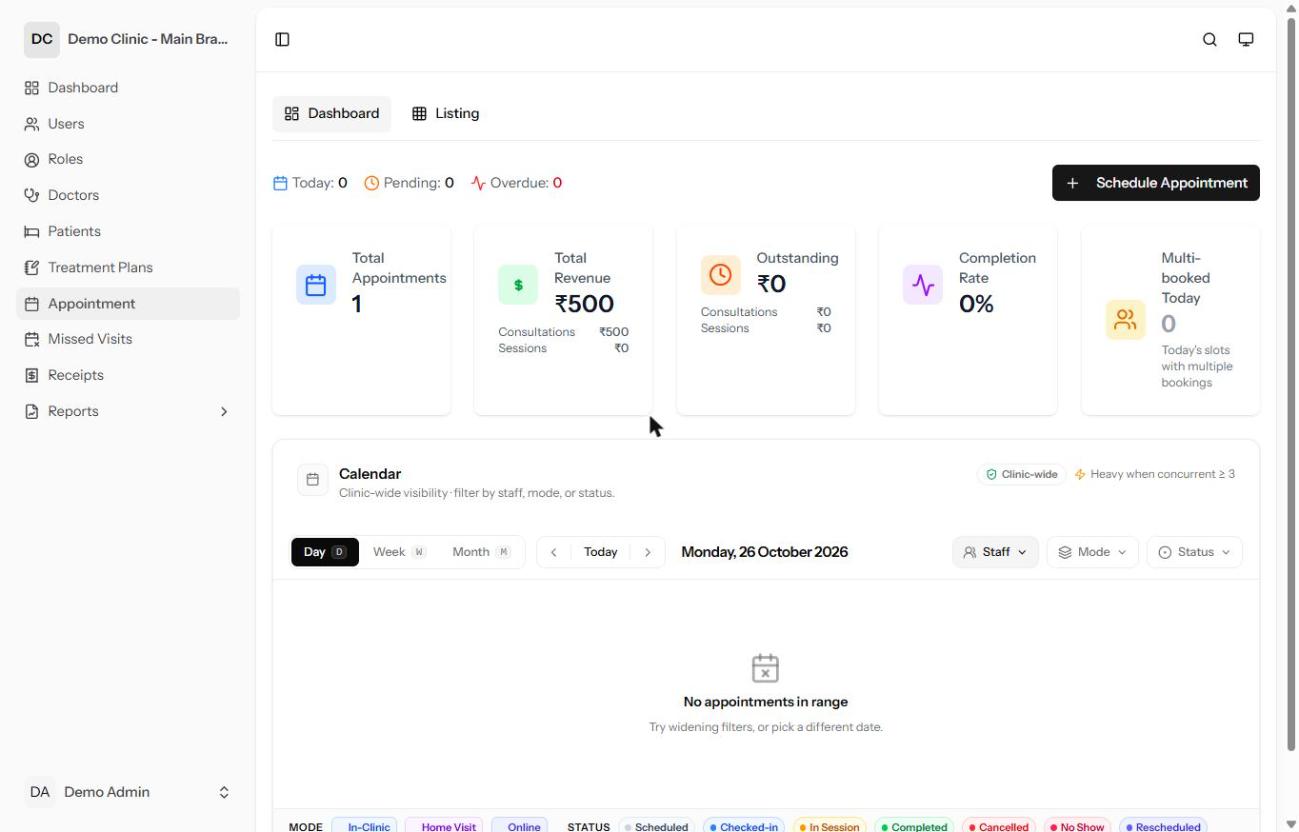
- Counters for Today, Pending and Overdue appointments, with a Schedule Appointment button.
- A clinic-wide calendar with Day, Week and Month views, filterable by staff, mode and status.
- Appointment modes: In-Clinic, Home Visit and Online.
- Statuses: Scheduled, Checked-in, In Session, Completed, Cancelled, No Show and Rescheduled.
Why no-shows and double bookings happen
When appointments are managed by phone and separate calendar apps, clinics run into double bookings, missed appointments and wasted therapist time throughout the day.
Practical steps clinics can take
- Remind every patient. Send a reminder before each appointment.
- Keep one calendar. Book and assign therapists in a single place so the schedule has no conflicts.
- Keep a waitlist. Offer popular slots to waiting patients when they open up.
- Look at your data. Use reports to review appointment history per patient.
How Phyjio supports each step
Phyjio includes automated reminders via SMS and email, a therapist-level calendar with availability management, and waitlist management. See the full appointment scheduling page.
Estimate what no-shows cost your clinic
No-show cost calculator
Enter your own numbers to estimate what missed appointments cost your clinic. Nothing is saved or sent anywhere.
Estimate based on 52 weeks per year and the figures you enter. It is not a Phyjio result or a promise of savings.
Where missed visits show up in Phyjio
Phyjio gives missed sessions a dedicated Missed Visits page, so they are not buried in a diary. Each row shows the patient, the treatment plan, the missed session number, the missed date, the plan status and the therapist. You can filter by patient, treatment plan, session number and date to find a specific case quickly.
A no-show reduction routine
- Use automated reminders so every patient is reminded before their appointment by SMS and email, as described on phyjio.com.
- Check the Missed Visits page at the start of each day and contact patients who missed their last session.
- Use the waitlist to refill slots that are cancelled in advance, so the time is not wasted.
- Look at the plan status for each missed patient; someone mid-course needs a different conversation from someone who has finished.
- Review the numbers weekly and note which days or times attract the most misses.
Measure whether it is working
The Appointment page shows a Completion Rate alongside Total Appointments, Total Revenue and Outstanding. If you are reducing missed visits, the completion rate should rise over time and the Missed Visits list should shrink. Pair this with the calculator on this page to estimate what each avoided no-show is worth in your clinic.
Why patients miss sessions
Common reasons include simply forgetting, confusion about the time, a change in circumstances and feeling better before the plan is finished. Reminders address forgetting and confusion; clear communication about the treatment plan addresses the last. A system that records each plan and its remaining sessions gives you something concrete to point to when you explain why finishing the course matters.
Frequently asked questions
What is a no-show in a physiotherapy clinic?
A no-show is a patient who misses a booked appointment without attending, leaving the therapist's time unused.
Does Phyjio send reminders?
Yes. Phyjio sends automated appointment reminders via SMS and email.
How does a waitlist help?
A waitlist lets a clinic offer popular appointment slots to waiting patients. Phyjio includes waitlist management for this.
Can Phyjio prevent double bookings?
Phyjio is designed to keep the clinic's daily calendar clean and conflict-free, with a therapist-level calendar view.
Fewer missed appointments, less wasted time
Start a free trial with no credit card required, and get free onboarding support from the Phyjio team.
Start Free TrialBook a Demo